

Product FAQ and Order Status Page Blocks
Release date: September 4, 2026
Two new HeiChat experiences are now available as Shopify theme App blocks. They are not automatically shown just by enabling a setting in HeiChat: add the relevant block in the Shopify Theme Editor before shoppers can use it.
Together, these blocks make important self-service experiences part of your storefront instead of leaving them only inside the chat bubble. Product FAQ helps shoppers make a purchase decision while they are evaluating a product. Order Status Page gives existing customers a clear destination for delivery and tracking questions. Both can reduce repetitive support contacts while keeping HeiChat available for the questions that need a conversation.
Product FAQ block
The HeiChat Product FAQ block adds AI-generated, product-specific FAQ questions and highlights directly to a product page. Shoppers can select a question to open a live HeiChat conversation with that question already filled in.
Unlike a generic FAQ section, the content is generated from the individual product's available information, such as its title, description, and variants. This makes the block especially useful for questions that otherwise slow down a purchase: materials, sizing, compatibility, care instructions, product differences, and other product-specific details. The answer opens in live chat, so it can use current store information rather than relying on a static answer that may become outdated.
Why it matters
- Give shoppers answers at the decision point. The FAQ appears where customers are already comparing a product, without asking them to search a help center or start with a blank chat.
- Turn common questions into guided conversations. Selecting a question gives HeiChat immediate context, making the next response more focused and useful.
- Improve product-page depth at scale. The block adds genuine question-and-answer content to product pages. This can make the page more useful to shoppers and more informative for search or AI crawlers, although indexing and ranking are always controlled by the relevant platform.
- Support multilingual storefronts. Choose the languages that matter to your store, then review and manage generated content from Learned Products.
To publish it:
- In HeiChat, enable Product FAQ in
Setup > Widget Settings > Feature Widgetsand select the languages to generate. - Open Shopify Theme Editor and open a product-page template.
- In Product information, select Add block > Apps > HeiChat Product FAQ.
- Move the block to the desired location and save the template.
The block is required. Enabling Product FAQ alone prepares generation, but does not add FAQ content to the storefront.
After launch, review generated FAQ under Setup > Learned Products > Generated FAQ. You can edit live questions directly, inspect generation history and token usage, or regenerate the source language when a product needs better source information. Other selected languages update from the source language in the background.
Order Status Page block
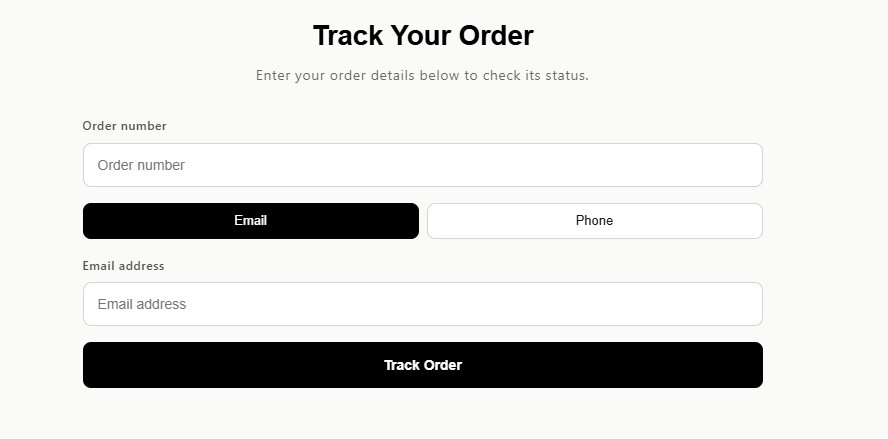
The HeiChat Order Status block creates a dedicated order-tracking experience on a Shopify page. Shoppers can look up an order using their order number and email address or phone number, then review order, payment, fulfillment, shipping, and tracking information.
It gives customers a clear self-service route for the most frequent post-purchase question: “Where is my order?” Instead of requiring them to open the chat widget or contact your team for a status check, you can link this page from navigation, order-confirmation emails, or shipping communications. The page can also include a Still need help? Chat with us action for customers whose issue needs more than order data.
Why it matters
- Reduce repetitive order-status contacts. Customers can check order and tracking information themselves, at any time.
- Create a shareable support destination. A dedicated page is easier to link from emails, account areas, and site navigation than an instruction to “open the chat bubble.”
- Keep escalations in context. Customers who still need help can move from the order-status experience into chat after reviewing the order information.
- Improve the post-purchase experience. Clear visibility into fulfillment and tracking can reduce uncertainty without requiring a manual support reply.
To publish it:
- Make sure the HeiChat app embed is enabled in Online Store > Themes > Customize > App embeds.
- Create or open the Shopify page that will host order tracking.
- In Shopify Theme Editor, select that page template.
- Choose Add section/block > Apps > HeiChat Order Status.
- Configure its copy and appearance, then save and publish.
The Order Status Page is also a theme App block. It does not appear as a standalone page until you add the block to a Shopify page template.
The Order Status Page and the Order Search Widget are complementary. Use the widget for a lightweight entry across the store; use this App block when you want a dedicated, linkable order-tracking page. You can use both. On a page that contains the Order Status block, HeiChat's floating launcher is hidden so the page remains focused on order lookup.
Both features require Pro Plus or above.