

Klaviyo Integration
This feature requires the Pro Plus plan or above.
Overview
With HeiChat's Klaviyo integration, you can automatically sync leads collected during on-site conversations to Klaviyo. At the moment, this mainly includes basic customer information such as email addresses, making it easier to continue with email marketing, automation flows, and customer segmentation in Klaviyo.
If you are already using Klaviyo to manage subscribers or marketing automation, this integration helps you bring leads collected by HeiChat into your existing workflow more smoothly.
Before You Start
Before you begin, please make sure:
- You already have access to an active Klaviyo account
- You can create and manage API keys in your Klaviyo dashboard
- You want to sync leads collected in HeiChat to Klaviyo Profiles
Configure Klaviyo in HeiChat
Go to Setup > Integrations > Klaviyo to open the Klaviyo settings page in HeiChat.
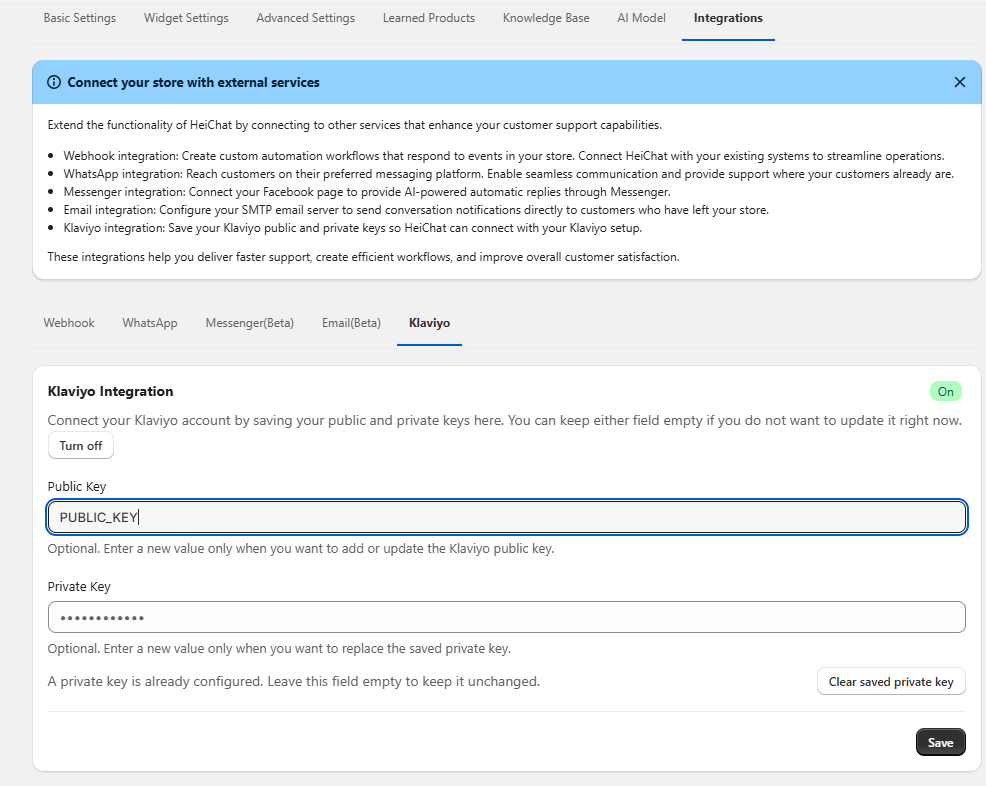
You can enter the following fields here:
- Public Key
- Private Key
These two keys are used for different purposes:
Private Keyis used to automatically sync leads collected by HeiChat to KlaviyoPublic Keycan be filled in as needed for other public-facing or frontend-related use cases
If your main goal is to enable automatic lead syncing, the key field is Private Key.
How to Get Your Klaviyo API Keys
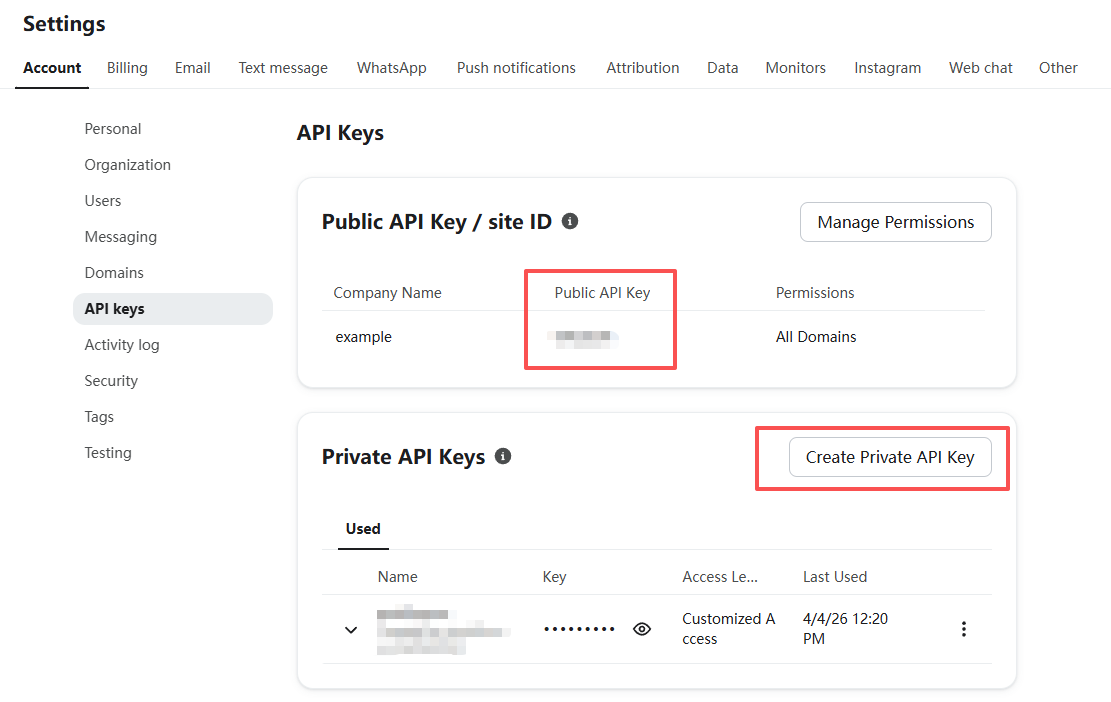
You can go directly to the API Keys page, or open Settings > Account > API keys in your Klaviyo dashboard.
On that page:
- The
Public Keyis usually displayed directly - The
Private Keyneeds to be created manually
Recommended Private Key Permissions
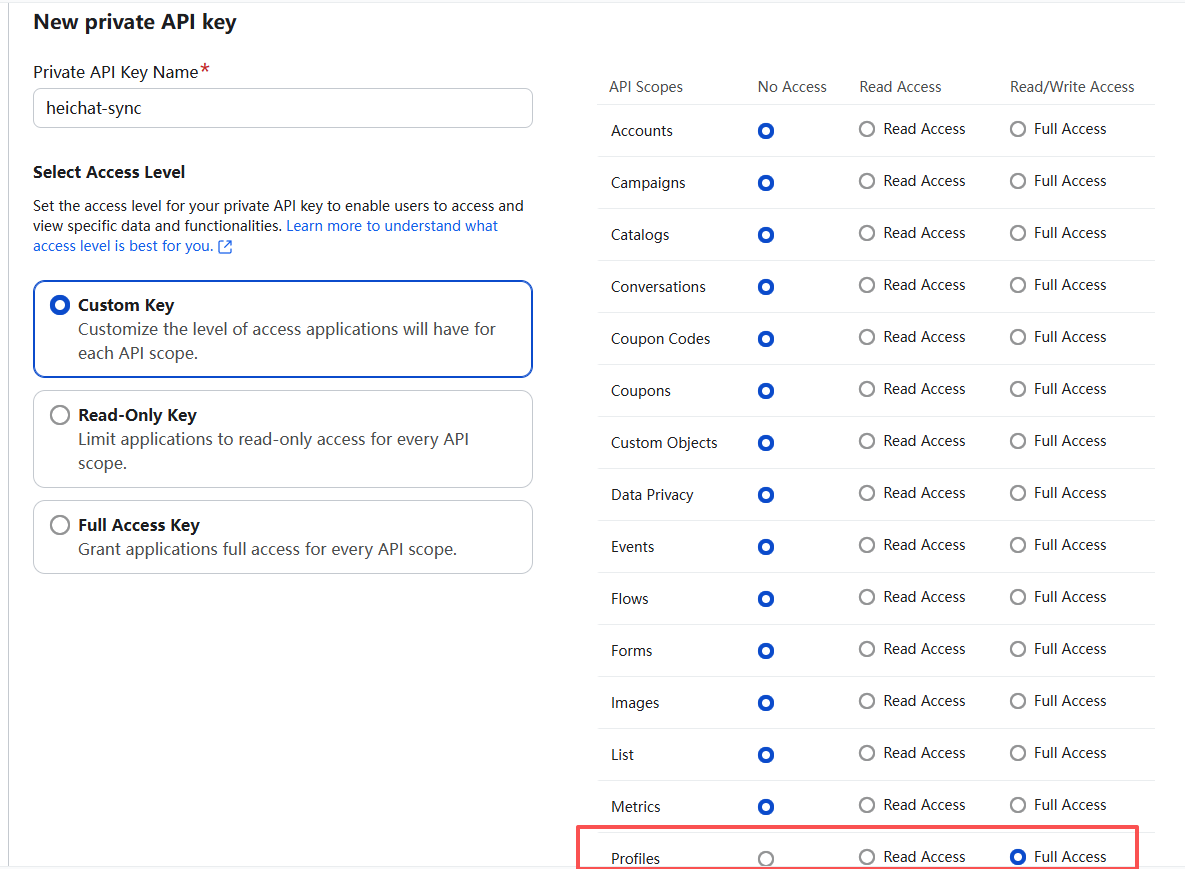
For security, we recommend following the principle of least privilege when creating your Private Key.
If you only want to sync leads to Klaviyo Profiles, it is recommended to grant access only to the Profile scope. In most cases, Profile Full Access is enough for the sync to work and there is no need to enable unrelated permissions.
This helps reduce risk while still allowing the integration to function properly.
What Happens After Setup
Once the Klaviyo integration is configured, HeiChat will automatically sync the leads it collects to Klaviyo Profiles. After that, you can use those profiles in Klaviyo for:
- Email subscriptions and marketing outreach
- Automation flow setup
- Customer tagging and segmentation
- Follow-up conversion and retention campaigns
Best Practices
- Use a
Private Keywith only the permissions you actually need - After setup, test with a real email address to confirm the data is successfully synced to Klaviyo
- If your store collects leads from multiple sources, consider organizing them further in Klaviyo with lists, tags, or flows
- Store your API keys securely and never expose the
Private Keyin public environments
Need Help?
If you run into any issues while configuring HeiChat's Klaviyo integration, contact the HeiChat support team at heicarbook@gmail.com